The Keychron BM27 Wireless Ergonomic Mouse offers a vertical ergonomic shape for comfort and a reliable PAW3212 sensor. It supports 2.4 GHz, Bluetooth, and wired connections with up to 100 hours of battery life, plus button remapping through the Keychron Launcher software.
This Keychron BM27 Wireless Ergonomic Mouse review examines the published specifications of the latest vertical mouse from Keychron. Based on brand data, it targets users seeking comfort and reliable performance for work and everyday tasks.
The BM27 features a vertical design to reduce wrist strain and packs a PAW3212 optical sensor. It offers three connectivity modes and up to 100 hours of battery life, making it a versatile option for desktop or portable use.
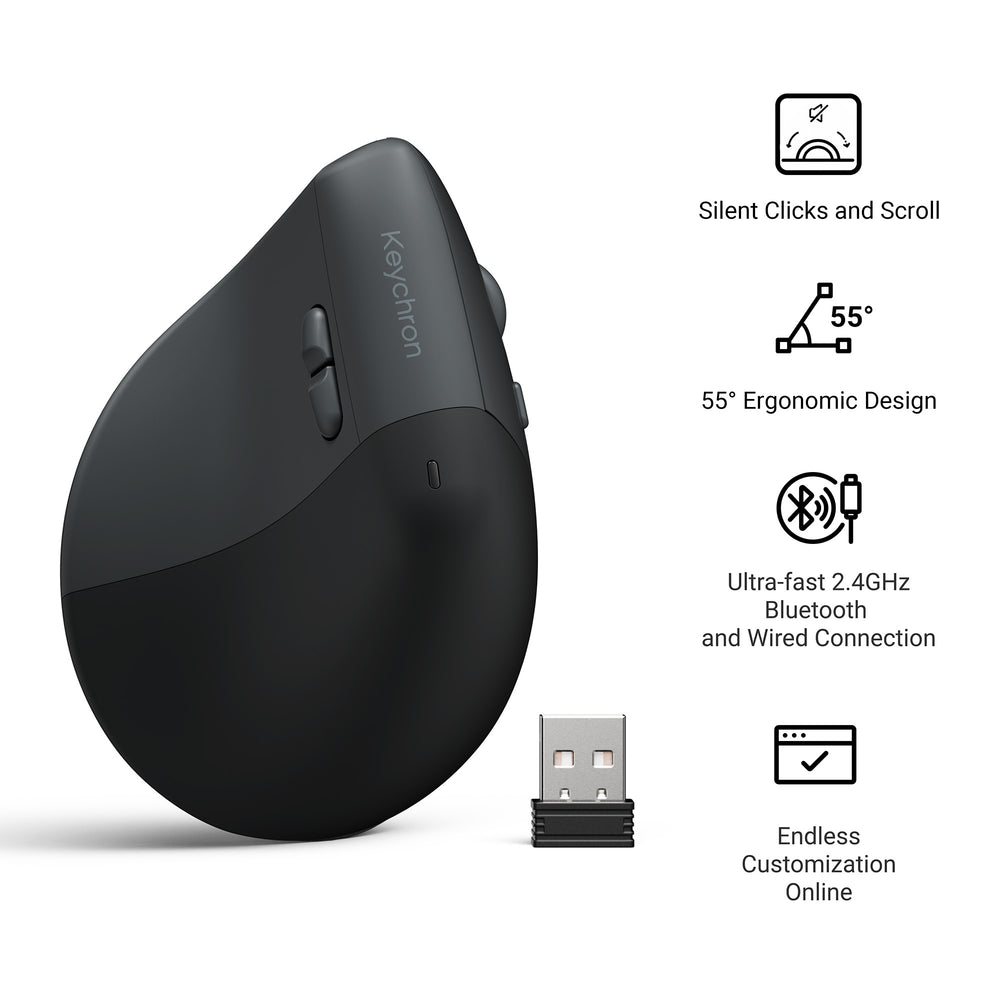
Published specs
| Spec | As published |
|---|---|
| Sensor | PAW3212 optical sensor |
| DPI | Up to 2,400 |
| Connectivity | 2.4 GHz, Bluetooth, wired (USB) |
| Battery Life | Up to 100 hours |
| Software Support | Keychron Launcher (button remapping and macros) |
| Shape | Ergonomic vertical |
| Product Category | Mice |
Who it suits
- Users prioritizing ergonomic comfort: The vertical shape is designed to reduce wrist strain during extended use, based on published product details.
- Professionals needing versatile connectivity: Supports 2.4 GHz, Bluetooth, and wired USB connections for flexible setups across multiple devices.
- Customization seekers: Button remapping and macro support via Keychron Launcher software adds control flexibility.
Who should skip
- Gamers requiring high DPI: Maximum DPI is 2,400, which may not suit competitive gaming where higher sensitivity is preferred.
- Users wanting side buttons or extra controls: The brand does not specify the number of programmable buttons beyond basic remapping capability.
- Those preferring a traditional mouse shape: The vertical design may take adjustment time for users accustomed to standard horizontal mice.
Pros
- Ergonomic vertical design aimed at hand and wrist comfort.
- Triple connectivity: 2.4 GHz, Bluetooth, and wired USB.
- Long battery life of up to 100 hours on a single charge.
- Button remapping and macro creation available through Keychron Launcher.
Cons
- Warranty policy is not stated by the brand in the available data.
- Shipping and return policy details are not provided.
- Exact dimensions and weight are not specified on the product page.
What It Is
The Keychron BM27 is a wireless ergonomic mouse from Keychron, a brand known for high-quality keyboards and mice. It is designed for work and everyday use, offering a vertical grip to reduce wrist strain. The mouse uses a PAW3212 optical sensor and connects via 2.4 GHz, Bluetooth, or a wired USB cable.
Key Features as Published
- PAW3212 Sensor: Reliable optical tracking for daily tasks.
- DPI up to 2,400: Adjustable sensitivity for different workflows.
- Triple Connectivity: 2.4 GHz wireless, Bluetooth, or USB wired connection.
- Battery Life: Up to 100 hours of use on a full charge.
- Keychron Launcher Software: Allows button remapping and macro programming.
Size, Power, and Compatibility Details
The brand does not state the exact dimensions, weight, or charging method (e.g., USB-C) in the provided data. Battery life is listed as up to 100 hours. The mouse is compatible with systems that support USB, Bluetooth, or 2.4 GHz receivers. No operating system requirements are mentioned.
Before You Buy
Check the current price on the brand site, as pricing is not stated here. Warranty, returns, and shipping policies are not covered in the product description. The mouse is listed under Keychron’s Mice category. If you need a vertical mouse with multi-device connectivity and software customization, the BM27 fits that description based on published specs.
Frequently asked questions
What sensor does the Keychron BM27 use?
The Keychron BM27 uses the PAW3212 optical sensor, as stated in the product specifications.
What connectivity options are available?
The BM27 supports 2.4 GHz wireless, Bluetooth, and wired USB connections.
How long does the battery last?
The brand states a battery life of up to 100 hours. The exact battery capacity and charging time are not provided.
Can I customize the buttons?
Yes, the Keychron Launcher software allows you to remap buttons and create macros.
Is the BM27 suitable for gaming?
The DPI range goes up to 2,400, which may be adequate for casual gaming, but the brand does not market it for gaming. It is described as designed for work and everyday use.