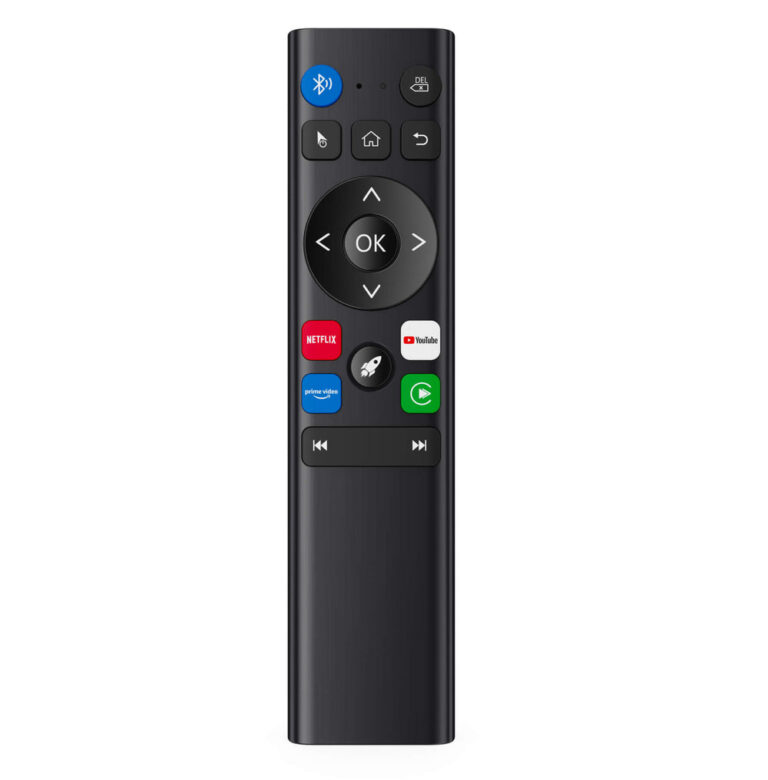
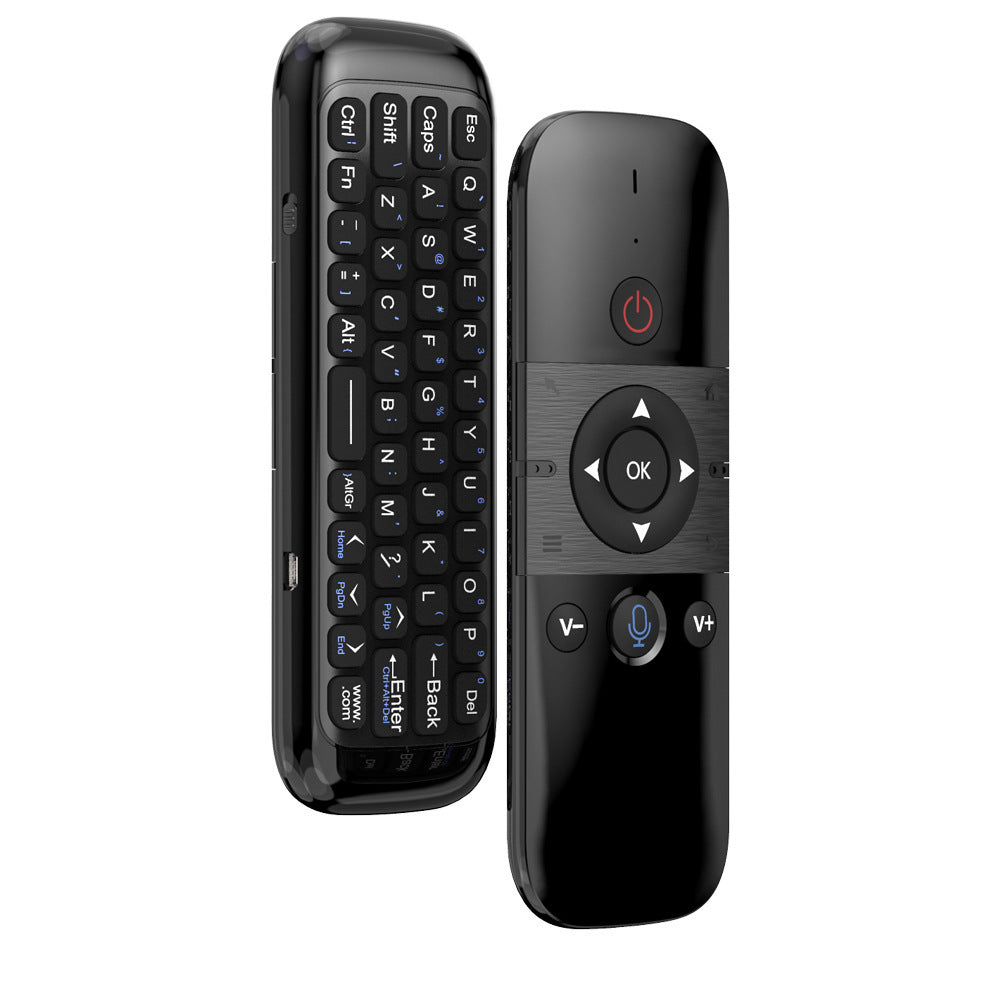
The M8 Voice Air Mouse Remote Control is a handheld wireless air mouse designed for Android TV boxes, Mini PCs, Smart TVs, and car screens. It offers a learning function to mimic a TV remote and a voice input feature, based on the brand’s published information. However, many technical details such as battery life, range, and connectivity type are not stated by the brand.
If you’re searching for an M8 Voice Air Mouse Remote Control review, you’ve come to the right place. This product from OTTOCAST is a handheld wireless air mouse that aims to simplify navigation on compatible devices like Android TV boxes, Mini PCs, Smart TVs, and car screens.
Based solely on OTTOCAST’s published information, the M8 includes a learning function to replicate TV remote commands and a voice input feature. Below we break down what the brand states about this device to help you decide if it fits your needs.
Published specs
| Spec | As published |
|---|---|
| Product Name | M8 Voice Air Mouse Remote Control |
| Type | Handheld wireless air mouse |
| Compatible Models | Android TV box, Mini PC, Smart TV, Car Screen |
| Learning Function | Yes – can learn from another remote (e.g., TV remote) |
| Voice Input | Yes – microphone button for voice commands |
| Learning Method | Align IR sensors 1-5 cm apart; press power button on target remote |
| Clear Code | Press 'OK' and 'Backspace (Delete)' simultaneously |
| Connectivity | Not stated by the brand |
| Battery Type / Life | Not stated by the brand |
| Dimensions / Weight | Not stated by the brand |
Who it suits
- Users who want a handheld air mouse for navigating Android TV boxes or Mini PCs from a distance.
- People who need a remote that can learn TV commands, reducing the number of remotes on the coffee table.
- Car owners with a compatible car screen who want voice input for hands-free control.
Who should skip
- If you require detailed technical specs like battery life, range, or wireless protocol – the brand does not state these.
- Users looking for a full keyboard – this is an air mouse with voice input, not a keyboard.
- Those who prefer a traditional remote with dedicated number keys or media playback buttons – the M8’s button layout is not detailed by the brand.
Pros
- Handheld wireless air mouse design for convenient pointer control.
- Learning function lets you copy TV remote power commands (based on brand description).
- Voice input feature for hands-free searching or commands.
- Compatible with multiple device types: Android TV box, Mini PC, Smart TV, car screen.
Cons
- Connectivity type (Bluetooth, RF, or IR) is not stated by the brand.
- Battery type, capacity, and estimated life are not provided.
- Physical dimensions and weight are not listed, making it hard to gauge portability.
What It Is
The M8 Voice Air Mouse Remote Control is a handheld wireless air mouse sold by OTTOCAST. According to the brand, it is designed for use with Android TV boxes, Mini PCs, Smart TVs, and car screens. It combines air-mouse pointer control with a learning function to mimic a TV remote and a built-in microphone for voice input.
Key Features as Published
- Learning Function: Press and hold the power button for 3 seconds to enter learning mode. Align the IR sensors of the M8 and the target remote (1-5 cm apart). Press the power button on the target remote; the indicator flashes three times to save the code. To clear, press ‘OK’ and ‘Backspace (Delete)’ simultaneously.
- Voice Input: A dedicated microphone button allows you to input voice commands (compatible with devices that support voice control).
- Compatibility: Works with Android TV box, Mini PC, Smart TV, and Car Screen (exact models not specified by the brand).
Size, Power & Compatibility Details as Published
The brand does not state the physical dimensions, weight, battery type, battery life, or wireless range of the M8. Connectivity method (e.g., Bluetooth, RF, or IR) is also not mentioned. Compatibility is listed broadly as ‘Android TV box / Mini PC / Smart TV / Car Screen’ without specific model lists. The learning function uses infrared (IR) communication between remotes, but the primary connection to the device is not clarified.
Before You Buy
Since OTTOCAST does not provide detailed technical specifications, consider contacting their support (support@ottocast.com) to confirm compatibility with your specific device and to ask about battery and connectivity details. The return policy notes that returns due to vehicle incompatibility (if using in a car) are treated as non-quality-related returns, so verify compatibility before ordering. Check the current price on the OTTOCAST website.
Frequently asked questions
Does the M8 Voice Air Mouse work with any Android TV box?
The brand states compatibility with ‘Android TV box’ but does not list specific models. It is best to contact OTTOCAST support to confirm compatibility with your particular device.
How do I set up the learning function?
According to the brand, press and hold the power button for 3 seconds until the indicator flashes. Align the IR sensors of the M8 and your target remote 1-5 cm apart, then press the power button on the target remote. The indicator will flash three times to confirm the code is saved.
What type of battery does the M8 use?
The brand does not state the battery type, capacity, or whether it is rechargeable or replaceable. This information is not available in the published data.
Can I use the M8 as a keyboard?
No, the M8 is described as an air mouse remote control with voice input. It does not include a keyboard. For text entry, you would rely on voice input or an on-screen keyboard.
What is the wireless range of the M8?
The brand does not specify the wireless range or the type of wireless connection (Bluetooth, RF, etc.). This detail is not stated in the product description.