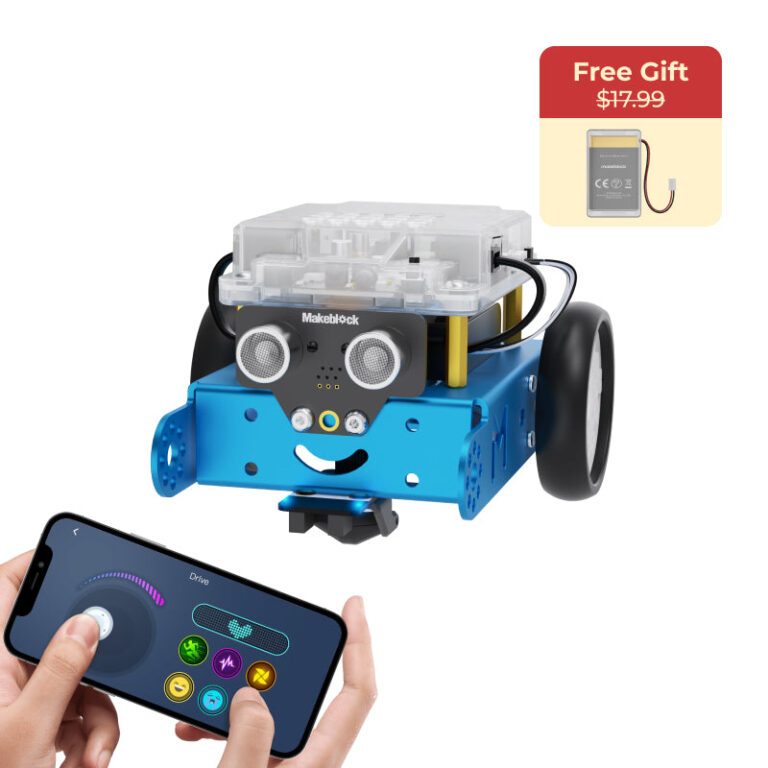
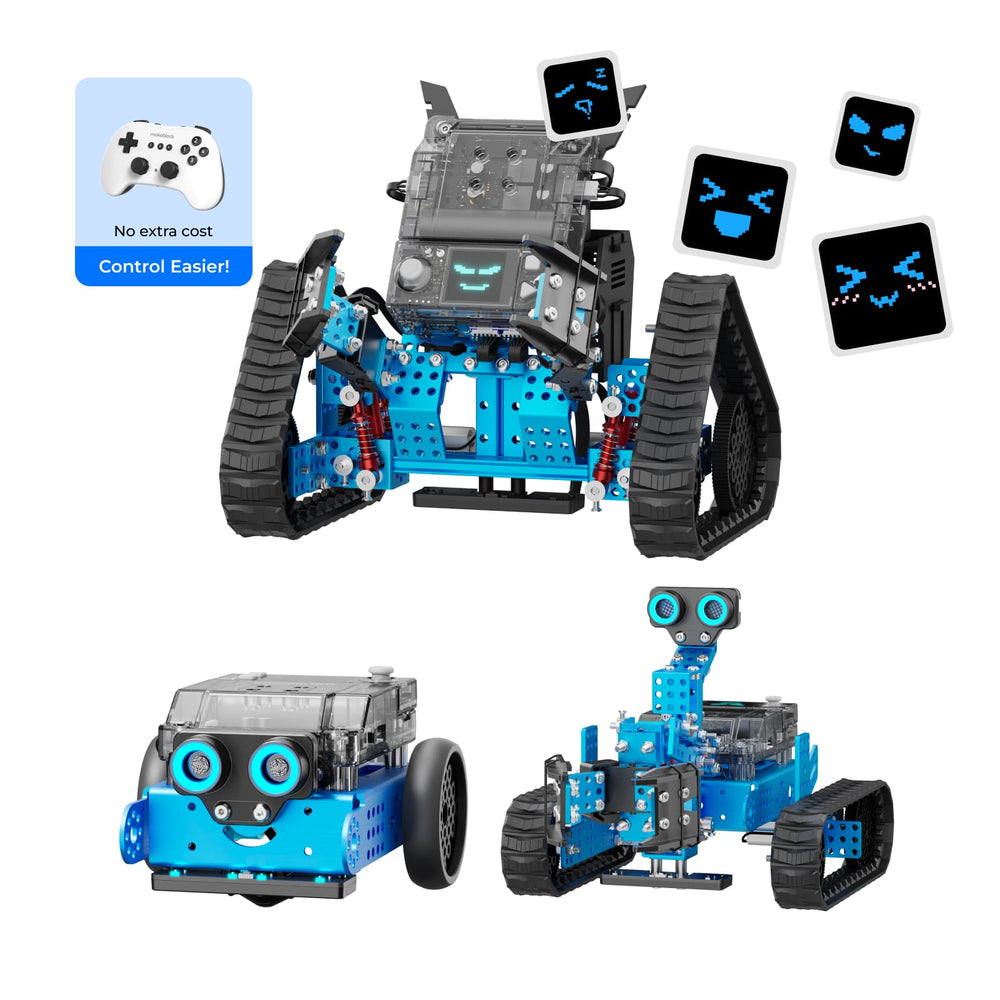
The Makeblock mBot2 Rover Robotics Kit lets you build three different robots: a coding robot, a tank with DIY emoji display, and a tank with a robotic arm. Its full-color screen supports custom emojis via AI or doodling in mBlock software. The kit teaches coding from block-based to Python and includes line-following, obstacle avoidance, and other actions.
If you searched for ‘Makeblock mBot2 Rover Robotics Kit Kid’s Interactive Emo review’, you’re likely considering a coding robot that combines outdoor fun with programmable emojis. Based on Makeblock’s published specs, this kit builds into three forms: a standard mBot2 robot, an mBot2 Rover tank with customizable emoji display, and an mBot2 Ranger tank with a robotic arm.
Makeblock offers this kit in their DIY Robot Kits category, designed for kids aged 8 to 12 and aligned with K3–K12 education. It features a full-color display screen, shock-resistant tracks for multi-terrain use, and a liftable robotic arm. The kit supports coding learning from block-based to Python, making it a versatile educational tool.
Published specs
| Spec | As published |
|---|---|
| Build Forms | 3 forms: mBot2 (coding robot), mBot2 Rover (tank with DIY emojis), mBot2 Ranger (tank with robotic arm) |
| Display | Full-color display screen |
| Emoji Customization | AI-generated or free doodling via mBlock software |
| Track Design | 2 types, shock-resistant for multi-terrain outdoor play |
| Robotic Arm | 2 types, lift up and down |
| Coding Languages | From block-based to Python (as per brand description) |
| Programmable Actions | Line following, obstacle avoidance, light sensing, dancing, playing music |
| Recommended Age | 8–12 years (brand tags: Age 8-12, Age 8+) |
| Product Category | DIY Robot Kits |
| Battery / Power | Not stated by the brand |
Who it suits
- Children aged 8–12 who are interested in learning coding through practical robot building.
- Beginners wanting to progress from block-based to Python programming with a single kit.
- Kids who enjoy outdoor play and want a robot that can handle different terrains with shock-resistant tracks.
Who should skip
- Children under 8, as the brand tags specify ages 8–12.
- Those who prefer a fully assembled robot – this is a DIY kit that requires building.
- Users who need detailed warranty information or international shipping outside the US (not offered by Makeblock’s store).
Pros
- Three distinct build forms increase replay value and teach different engineering concepts.
- Full-color display lets kids create custom emojis using AI or their own drawings, adding a creative element.
- Support for block-based and Python coding allows progressive learning from beginner to more advanced.
- Shock-resistant track design enables outdoor exploration on multiple terrains.
Cons
- Warranty terms are not stated by the brand, which may concern some buyers.
- International shipping is not available directly from Makeblock’s US store; international customers need to inquire separately.
- Battery life, dimensions, and weight are not specified in the published product details.
What It Is
The Makeblock mBot2 Rover Robotics Kit is a DIY robot kit that can be assembled into three different configurations. According to Makeblock’s product description, the three forms are:
- mBot2 – a standard coding robot.
- mBot2 Rover – a robot tank with a full-color display that shows DIY emojis.
- mBot2 Ranger – a robot tank equipped with a robotic arm that can lift up and down.
The kit includes a full-color display screen that supports customizing Rover’s emojis through AI generation or free doodling in the mBlock software. It also comes with two types of robot tracks designed for multi-terrain outdoor play with shock resistance.
Key Features as Published
- Three Build Forms – Encourages creativity and understanding of different robot mechanics.
- Full-Color Display – Allows custom emoji expressions via AI or free drawing.
- Innovative Robot Track – Two track designs for outdoor exploration on varied surfaces, with shock resistance.
- Lift up and Down – Build two types of robotic arms to spark engineering thinking.
- Rich Robot Actions – Includes line following, obstacle avoidance, light sensing, dancing, and playing music.
- Coding Learning – Supports coding from block-based to Python (as implied by the brand’s description fragment).
Size, Power & Compatibility Details
The brand does not publish the physical dimensions, weight, battery specifications, or power requirements of this kit. Based on the product tags, it is aimed at children aged 8–12 and fits K3–K8 and K8–K12 educational levels. The kit uses the mBlock software (compatible with computers) for programming and emoji customization. Makeblock does not specify which operating systems are supported; check the mBlock software requirements separately.
Before You Buy
Shipping: Makeblock offers free standard shipping on orders over a certain amount (stated on the brand page) within the US. International orders are not accepted through the Makeblock store; customers outside the US should visit the brand’s international site for purchase inquiries. Package handling takes 1–3 business days and delivery 7–10 business days.
Returns: Unused, unopened items in original packaging can be returned within 30 days from dispatch for an exchange or refund. You must contact customer service for a return address and pay return shipping charges. Shipping fees are non-refundable. Used items are not accepted.
Warranty: Warranty policy is not stated by Makeblock for this product.
Frequently asked questions
What age group is the Makeblock mBot2 Rover Robotics Kit designed for?
The brand lists tags including ‘Age 8 – 12’ and ‘Age 8+’, so the recommended age is 8 to 12 years. It also aligns with K3–K8 and K8–K12 education levels.
How many different robots can I build with this kit?
You can build three forms: the mBot2 (standard coding robot), the mBot2 Rover (tank with DIY emoji display), and the mBot2 Ranger (tank with a robotic arm). Each form offers different capabilities.
Does the robot come with a remote control?
The brand does not mention a remote control in the product description. The kit is programmed via the mBlock software and can perform autonomous actions like line following and obstacle avoidance.
What coding languages does the kit support?
Based on the product description, the kit supports coding learning from block-based programming to Python (the brand’s text reads ‘From block-based to P’, implying Python). It uses the mBlock software for both approaches.
Can I use the robot outdoors?
Yes, the kit includes innovative tracks designed for outdoor play on multiple terrains, with shock resistance. The product description highlights ‘outdoor exploration in multi-terrains’.
What are the return and warranty policies?
Makeblock accepts returns of unused, unopened items in original packaging within 30 days of dispatch. You pay return shipping and a refund will be issued after inspection. Warranty terms are not stated by the brand.